InVideo Review 2026: Create Professional Videos with AI in Minutes
InVideo AI review for 2026. Is this video maker worth it? In-depth look at features, pricing, pros & cons, plus comparisons to Canva, Synthesia, and CapCut. Includes free plan details and real-world use cases.
2/8/202612 min read
InVideo Review 2026: Create Professional Videos with AI in Minutes
Full disclosure: This post contains affiliate links. If you sign up through them, I may earn a commission at no extra cost to you. Prices and features are current as of January 2026, based on official sources.
What Is InVideo?
InVideo AI is an AI-powered video creation platform and online video maker that lets you create professional videos from text prompts, scripts, or templates. Instead of spending hours learning complex video editing software, you can generate polished videos in minutes using generative AI technology — perfect for social media clips, marketing videos, YouTube channels, and business presentations.
The platform combines an intuitive drag & drop editor with artificial intelligence capabilities that can turn your ideas into videos automatically. Whether you're a content creator, marketer, social media influencer, or small business owner, InVideo AI makes video production accessible without requiring technical skills or advanced editing knowledge.
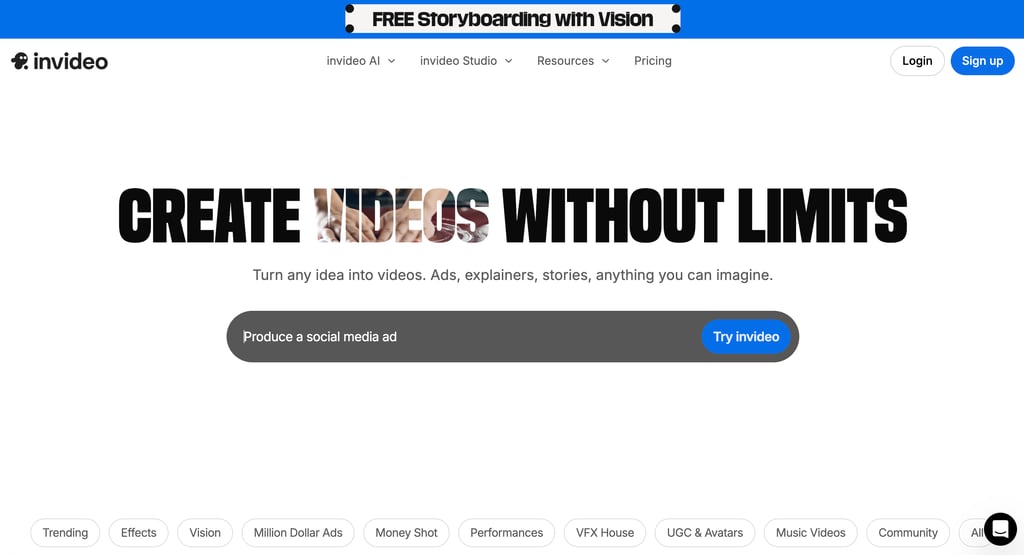
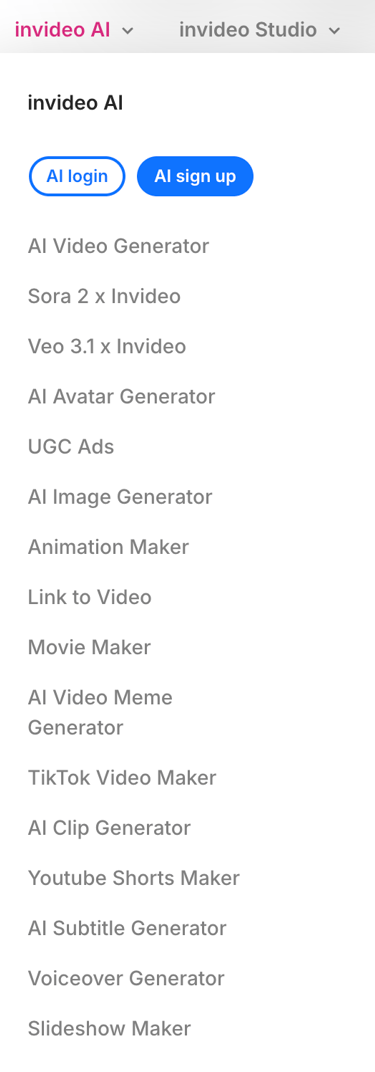
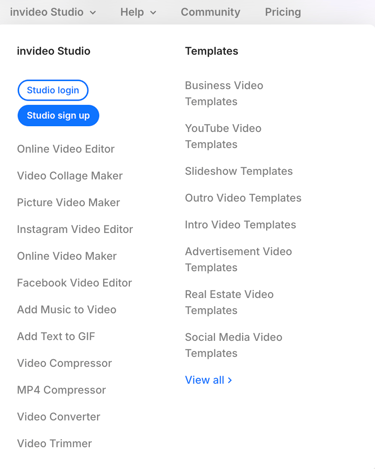
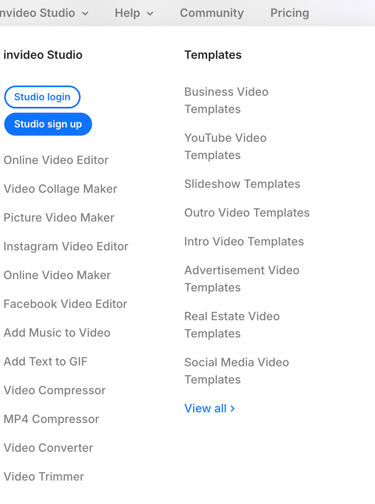
InVideo offers two main products: InVideo AI for automated text-to-video generation, and InVideo Studio for more hands-on video editing with templates.
How it works:
Enter a text prompt or paste your script
InVideo AI generates a complete video with AI-generated visuals, music, and voice over
Customize using the drag & drop editor
Choose from 5,000+ templates in the templates library
Access millions of stock footage, stock photo, and music media assets
Export and publish to social media or download
Think of it like this:
Traditional video editing: Learn complex software, source footage, edit for hours
InVideo: Describe what you want, AI creates it, tweak and publish
Main features:
AI video generation (text-to-video tools)
5,000+ customizable templates
Stock media library (millions of media assets)
AI voiceover and text-to-speech
Brand kits for consistency
Direct social media publishing
Collaboration tools for teams
Who uses it:
Social media marketers creating content at scale
Small business owners making promotional videos
YouTubers and content creators producing content faster
Course creators building educational videos
Marketing teams and agencies managing client projects
E-commerce businesses creating product videos
Social media influencers needing quick turnaround
Affiliate marketing professionals creating promotional content
InVideo is best for creators who need professional-looking videos quickly without mastering complex video editing software. It's not for filmmakers needing cinema-quality control, but for practical, efficient AI-powered video creation.
Key Features (What Can It Actually Do?)
1. AI Video Generator (Text-to-Video)
This is InVideo AI's flagship feature for AI-powered video generation. Describe what you want, and the generative AI creates a complete video — making it one of the leading text-to-video tools available in 2026.
How it works:
Enter a text prompt: "Create a 60-second video about the benefits of meditation"
Or paste a script/blog post for the AI to visualize
InVideo AI generates scenes, selects stock footage, adds music, and creates AI voiceover
Review and edit the generated video using the drag & drop editor
Export when satisfied
What you can create:
YouTube videos from scripts
Social media clips and reels
Short-form video creation for TikTok and YouTube Shorts
Explainer videos and animated videos
Product demonstrations
Listicle videos (Top 10, How-to)
Promotional content with call to action elements
PowerPoint presentations converted to video
Quality:
AI selections are surprisingly relevant with good AI-generated visuals
Usually needs 10-20 minutes of tweaking
Better than starting from scratch
Not perfect but a huge time-saver for AI content generation
My take: The AI video generation is impressive for a first draft. It gets you 70-80% of the way there, and you polish the rest. Massive time saver for any content creator.
Rating: 9/10 — Game-changing for fast video production.
2. Templates Library (5,000+ Options)
InVideo Studio offers thousands of pre-designed templates in the templates library for every use case, making this video editing platform accessible to beginners.
Template categories:
Social media (Instagram, TikTok, YouTube, Facebook)
Business (presentations, promos, ads)
Marketing (testimonials, product launches)
Education (tutorials, explainers)
Lifestyle (travel, fitness, food)
Events (invitations, announcements)
Animated videos with motion design elements
How to use templates:
Browse by category or search
Preview templates before selecting
Customize text, colors, fonts, media assets
Replace stock footage with your own
Adjust timing, transitions, and visual effects
Select aspect ratio for different platforms (16:9, 9:16, 1:1)
My take: The templates library is extensive and well-organized. Whatever video type you need, there's probably a template for it. Great for beginners who need a starting point and want a positive user experience.
Rating: 8/10 — Comprehensive and easy to use.
3. Stock Media Library
Access millions of royalty-free and copyright-free media without leaving InVideo, including iStock visuals and premium stock footage.
What's included:
Stock videos and stock footage from iStock and Storyblocks
Stock photo images (millions of options)
Music tracks (royalty-free)
Sound effects
Animated stickers and custom graphics elements
How it works:
Search within the editor
Preview before adding to timeline
Drag and drop into your video
No additional licensing fees for copyright-free media
My take: Having stock media built-in is incredibly convenient. No need to visit external sites or worry about licensing. The selection of media assets is solid for most use cases.
Rating: 8/10 — Convenient and well-integrated.
4. AI Voiceover and Text-to-Speech
Add professional voice over narration without recording yourself using InVideo's AI voiceover feature.
Features:
Multiple AI voices (male, female, various accents)
Adjust speed and pitch
Multiple languages supported
Natural-sounding output
Sync with video automatically
How to use:
Type or paste your script
Select voice style
Generate AI voiceover
Sync with video timeline
Quality:
Good enough for most generative content
Not as realistic as dedicated tools like ElevenLabs
Serviceable for social media clips and business videos
My take: The AI voiceover is functional but not best-in-class. For quick social media content, it works fine. For polished YouTube content, you might want a dedicated voice tool.
Rating: 7/10 — Gets the job done.
5. Brand Kits
Maintain consistency across all your videos with brand kits.
What you can save:
Logo
Brand colors
Fonts
Intro/outro clips
Watermarks
Custom graphics
Use cases:
Agencies managing multiple clients
Businesses maintaining brand identity
Content creators with established visual style
Marketing teams needing consistency
My take: Essential for anyone creating videos regularly. Set it up once, apply to every video. Simple but valuable for the overall user experience.
Rating: 8/10 — Important for brand consistency.
6. Collaboration Tools
Work with team members on video projects using InVideo's collaboration tools.
Features:
Invite team members
Share projects
Comment and feedback
Role-based permissions
Version history
Cloud storage for all projects
Best for:
Marketing teams
Agencies with multiple editors
Content teams with review processes
Rating: 7/10 — Solid team features.
Pricing Plans: What Does It Actually Cost?
InVideo offers straightforward pricing with a generous free tier. The platform uses Generative Credits for AI features.
Pricing Breakdown (January 2026)
Free Plan:
Price: $0/month
Credits: 1 AI credit/week
Video Minutes: 2 mins/week
Exports: 4/week (with InVideo watermark)
Avatars: 1 Express avatar
Storage: Limited
Best for: Basic testing of the video maker
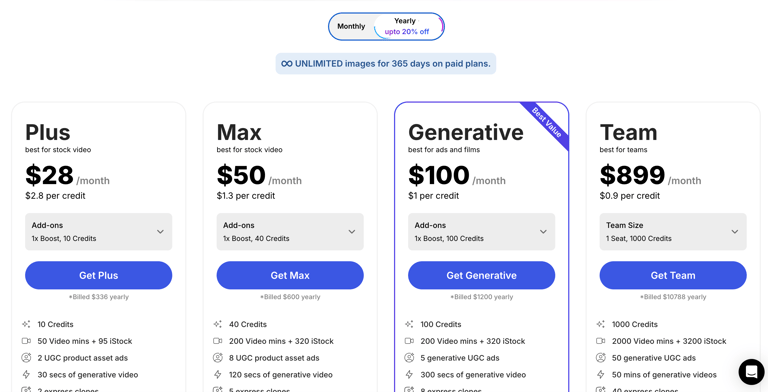
Plus Plan:
Monthly: $28/month
Annual: $336/year (~20% off)
Credits: 10 credits ($2.80 per credit)
Video Minutes: 50 mins + 95 iStock assets
Features: 2 UGC product asset ads, 30 secs generative video, 2 express clones, unlimited exports (no watermark), unlimited image generations
Users: 3
Storage: 100GB cloud storage
Best for: Individual content creators
Max Plan:
Monthly: $50/month
Annual: $600/year (~20% off)
Credits: 40 credits ($1.30 per credit)
Video Minutes: 200 mins + 320 iStock assets
Features: 8 UGC product asset ads, 120 secs generative video, 5 express clones, unlimited exports, unlimited image generations
Users: 3
Storage: 400GB cloud storage
Best for: Regular creators and marketing teams
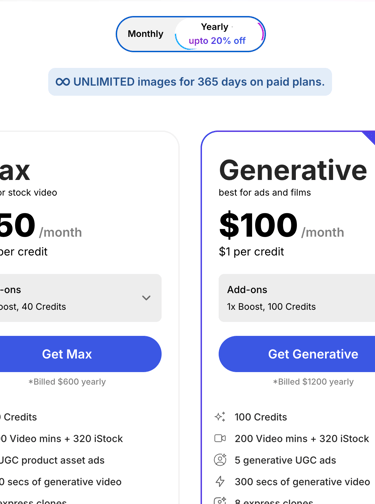
Generative Plan (Best Value):
Monthly: $100/month
Annual: $1,200/year (~20% off)
Credits: 100 credits ($1.00 per credit)
Video Minutes: 200 mins + 320 iStock assets
Features: 5 generative UGC ads, 300 secs generative video, 8 express clones, unlimited exports, unlimited image generations
Users: 3
Storage: 400GB cloud storage
Best for: Heavy AI video generation users
Team Plan:
Monthly: $899/month
Annual: $10,788/year
Credits: 1,000 credits ($0.90 per credit)
Video Minutes: 2,000 mins + 3,200 iStock assets
Features: 50 generative UGC ads, 50 mins generative videos, 40 express clones, unlimited exports
Users: 1 seat (add more)
Storage: 4TB cloud storage
Best for: Larger marketing teams and agencies
Enterprise Plan:
Pricing: Custom (contact sales)
Features: Custom solutions, advanced security, flexible pricing structure
Best for: Large organizations
My Pricing Recommendation:
If you're testing: Free plan lets you try with 2 video mins + 1 AI credit per week (watermarked)
If you create 5-10 videos/month: Plus plan ($28/mo) gives 50 video mins and removes watermark
If you need more AI features: Max plan ($50/mo) quadruples your credits to 40/month
If AI generation is your focus: Generative plan ($100/mo) offers best value at $1/credit
Don't overpay: Start with Plus. Upgrade to Max or Generative only if you consistently need more Generative Credits for AI-powered video generation.
Customer Support and Service
InVideo provides multiple customer support options to help users get the most from the video editing platform.
Support Options:
Live Chat: Available for quick questions
Email Support: For detailed inquiries
Help Center: Extensive documentation and tutorials
Video Tutorials: Step-by-step guides for features
Community Forum: Connect with other users
Support Team Quality:
The support team is generally responsive, with most queries answered within 24 hours. Users report positive support ratings for the customer service experience, especially on paid plans which receive priority assistance.
My take: Customer support is solid. The help center covers most common questions, and the support team responds reasonably fast. Not the fastest I've seen, but adequate for a tool at this price point.
Rating: 7/10 — Reliable customer service.
Pros and Cons (The Honest Truth)
Pros
1. Incredibly fast video creation Go from idea to finished video in 10-30 minutes with AI-powered video generation. The generative AI does the heavy lifting.
2. No advanced editing skills required The user interface is intuitive. If you can use Canva, you can use this video maker.
3. Massive templates library 5,000+ templates means there's something for every use case in this video editing platform.
4. Built-in stock media No need to source footage elsewhere. All media assets including iStock visuals are integrated.
5. Generous free plan 3 videos/week lets you properly test before committing to this AI marketing toolkit.
6. InVideo AI text-to-video is impressive Describe what you want, get a working first draft with AI-generated visuals. Magic.
7. Affordable pricing $20-25/month is reasonable for unlimited AI content generation and video creation.
8. Multiple aspect ratio options Easy to create content optimized for different social media platforms.
Cons
1. Watermark on free plan Free exports have the InVideo watermark. Need to pay to remove.
2. AI isn't perfect Generated videos need manual tweaking. Don't expect publish-ready output from AI generation alone.
3. Less control than traditional video editing software Power users wanting advanced editing might feel limited. This isn't Premiere Pro.
4. AI voiceover is mediocre Voice over quality is functional but not premium quality compared to dedicated AI tools.
5. Can feel template-y Heavy template use can make videos look generic. Customization with custom graphics helps.
6. Internet-dependent Browser-based video editing platform means you need stable internet. No offline editing.
7. Generative Credits can run out Heavy users of AI features may need to monitor their Generative Credits usage.
Overall Assessment:
InVideo AI excels at fast, accessible video creation for non-editors. It's perfect for social media clips, marketing videos, and content creators who need volume over cinema quality.
If you need quick, professional-looking videos without a learning curve, InVideo delivers. If you need precise control, motion design, or cinematic visual effects, stick with traditional video editing software.
Rating: 4.5/5 stars
Who Should Use InVideo?
Perfect For:
Social media marketers Create content at scale for Instagram, TikTok, YouTube Shorts, and more. The AI generation and templates make high-volume short-form video creation feasible. A great AI marketing toolkit for marketing teams.
Small business owners Make promotional videos, product demos, and ads without hiring a videographer or learning complex video editing software.
Content creators and YouTubers Speed up your production workflow. Use InVideo AI for first drafts and templates for consistent style. Perfect for any content creator needing efficiency.
Social media influencers Create engaging social media clips quickly to maintain consistent posting schedules and audience engagement.
Course creators Build educational videos and tutorials quickly. Templates help maintain professional quality with good user experience.
Marketing teams and agencies Manage multiple client projects with brand kits and collaboration tools. The AI marketing tools streamline production.
E-commerce businesses Create product videos, testimonials, and promotional content efficiently with this video maker.
Affiliate marketing professionals Create promotional and review videos quickly to support affiliate marketing campaigns.
Maybe For:
Casual creators (1-2 videos/month) The free plan might be enough. Paid plans are overkill for light use of this video editing platform.
Podcasters InVideo can create audiograms and video clips, but dedicated tools might be better for advanced editing.
Not Ideal For:
Professional filmmakers InVideo is for efficiency, not cinema. Use Premiere, Final Cut, or DaVinci for serious projects requiring advanced editing and visual effects.
Creators needing motion design and VFX Motion graphics, visual effects, and complex compositing aren't InVideo's strength.
Offline workflows Browser-based only. Need internet access to use this video creation platform.
InVideo vs Competitors
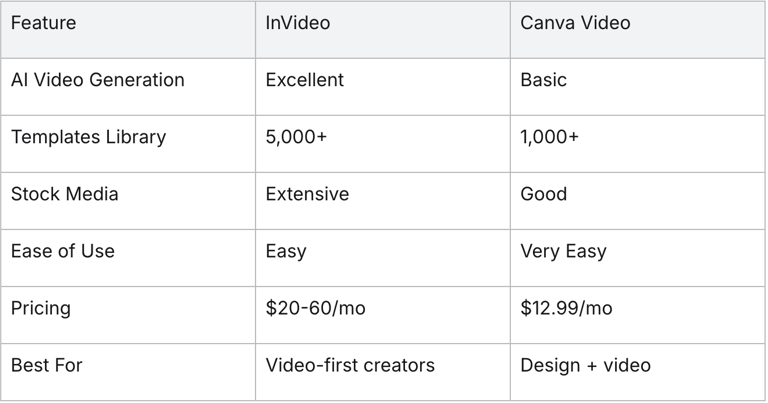
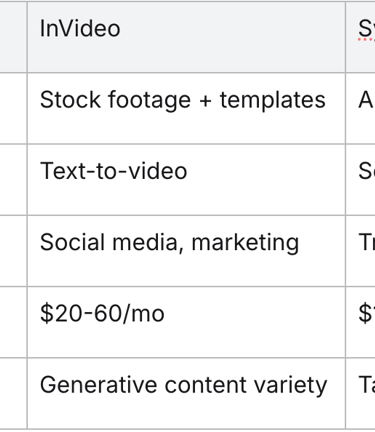
InVideo vs Canva Video
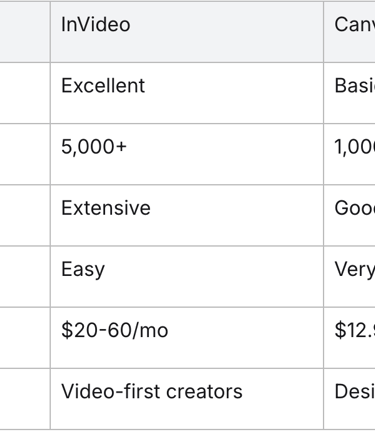
My take: InVideo AI is better for dedicated video creation and AI-powered video generation. Canva is better if you need design tools too.
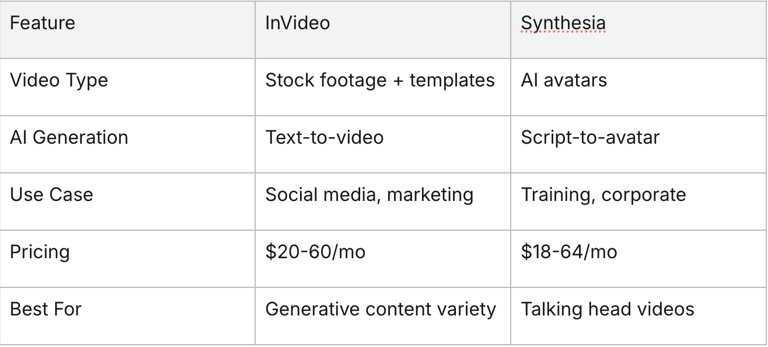
InVideo vs Synthesia
My take: Different AI tools for different purposes. InVideo for dynamic content and social media clips, Synthesia for presenter-style videos.
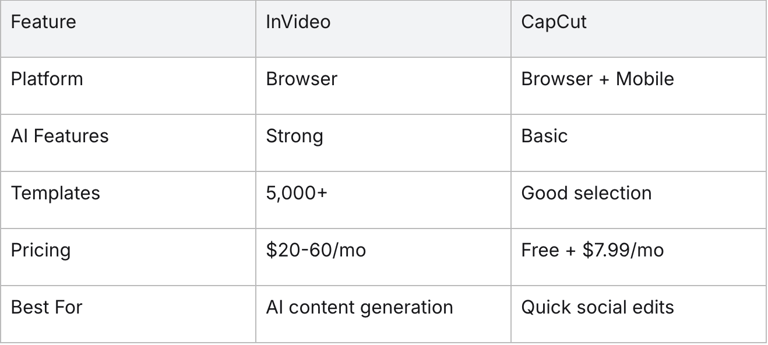
InVideo vs CapCut
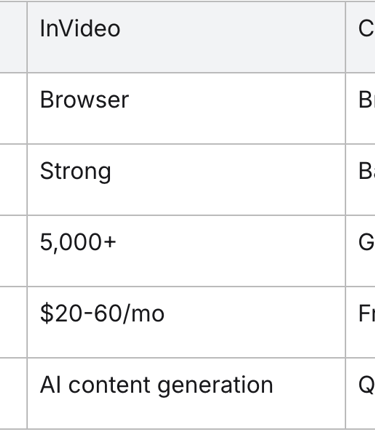
My take: CapCut is cheaper and great for quick edits. InVideo AI is better for AI-powered video creation and business use as a complete video maker solution.
Real-World Use Cases
Use Case 1: Social Media Manager
Scenario: Agency managing social content for 5 clients
Before InVideo:
3-4 hours per video
Juggling multiple tools for footage, editing, music
Inconsistent quality across clients
After InVideo:
30-45 minutes per video using templates and AI generation
All media assets in one place
Brand kits maintain consistency per client
Output increased from 20 to 60 videos/month
ROI: Max plan at $60/mo saves 40+ hours monthly for the marketing team
Use Case 2: YouTube Content Creator
Scenario: Solo creator making 2 videos per week
Before InVideo:
6-8 hours editing per video
Struggling with B-roll and AI-generated visuals
Burnout from production workload
After InVideo:
Use InVideo AI to generate B-roll sequences
Templates for intros, outros, and transitions
Video editing time reduced to 3-4 hours
More time for content strategy and audience engagement
Use Case 3: E-commerce Business
Scenario: Online store needing product videos
Before InVideo:
Hiring freelancers at $200-500 per video
1-2 week turnaround
Limited video content
After InVideo:
Create product videos in-house with this video maker
Same-day turnaround
Plus plan at $25/mo replaces freelancer costs
10x more video content on product pages with strong call to action elements
Getting Started with InVideo
Step 1: Sign Up
Go to InVideo (use link below)
Sign up with email or Google
Start with Free plan to explore the video creation platform
Step 2: Choose Your Creation Method
Option A: InVideo AI (Text-to-Video)
Click "Create AI Video"
Enter your text prompt or script
Let AI generation create the first draft
Option B: InVideo Studio (Templates)
Browse the templates library
Filter by category, style, or platform
Select aspect ratio for your needs
Customize with the drag & drop editor
Option C: Blank Canvas
Start from scratch in the video editing platform
Full control over every element
Step 3: Customize
Replace stock footage with your own media assets
Edit text and captions
Adjust colors to match brand using brand kits
Add/change music and sound effects
Tweak timing, transitions, and visual effects
Add custom graphics and animated videos elements
Step 4: Add Voice Over
Use AI voiceover for automated narration
Or upload your own voice over recording
Sync with video timeline
Step 5: Export and Publish
Choose resolution (up to 1080p)
Select aspect ratio for specific platform (YouTube, Instagram, etc.)
Export for download or publish directly to social media
Pro tip: Start with InVideo AI for your first video. See what the AI generation creates, then learn to refine from there for a better user experience.
Final Verdict: Is InVideo Worth It?
Yes — if you need to create videos quickly without mastering complex video editing software.
InVideo AI is one of the best AI-powered video generation tools and video maker platforms in 2026 for content creators, marketers, and businesses who value speed and accessibility over cinema-quality control.
The bottom line:
If you create 5+ videos per month for social media, YouTube, or marketing, InVideo will save you hours every week. The AI video generation and text-to-video tools alone justify the subscription for any serious content creator.
If you create 1-2 videos per month, the free plan might be enough, or consider whether you really need a dedicated video editing platform.
If you need professional, cinematic quality with advanced editing, motion design, and visual effects, InVideo isn't the right tool. Stick with Premiere, Final Cut, or DaVinci Resolve.
Who Gets the Most Value:
Free plan is perfect for:
Testing the video maker platform
Occasional creators (1-3 videos/month with watermark)
Plus plan ($20-25/mo) is worth it for:
Regular content creators (5-15 videos/month)
Small businesses and solopreneurs
Anyone who needs watermark-free exports and more Generative Credits
Max plan ($48-60/mo) makes sense for:
High-volume creators (20+ videos/month)
Marketing teams and agencies
Anyone needing unlimited exports and cloud storage
The Bottom Line:
Rating: 4.3/5 stars
InVideo AI isn't perfect — the AI generation needs refinement, AI voiceover is mediocre, and power users will want more control than this video editing platform offers. But for fast, accessible video creation with AI-generated visuals at an affordable price, it's one of the best AI tools and AI marketing toolkit options in 2026.
Start with the free plan, create a few videos, and see if it fits your workflow. Most content creators see immediate time savings with this video maker.
Related Posts: