Synthesia Review 2026: Create AI Avatar Videos in Minutes (No Camera Needed)
Comprehensive Synthesia review: AI avatar videos, features, pricing, and use cases. Is it worth $22-67/month? Complete guide for businesses and creators.
1/30/202610 min read
Synthesia Review 2026: Create AI Avatar Videos in Minutes (No Camera Needed)
Full disclosure: This post contains affiliate links. If you sign up through them, I may earn a commission at no extra cost to you. Prices and features are current as of January 2026, based on official sources.
What Is Synthesia?
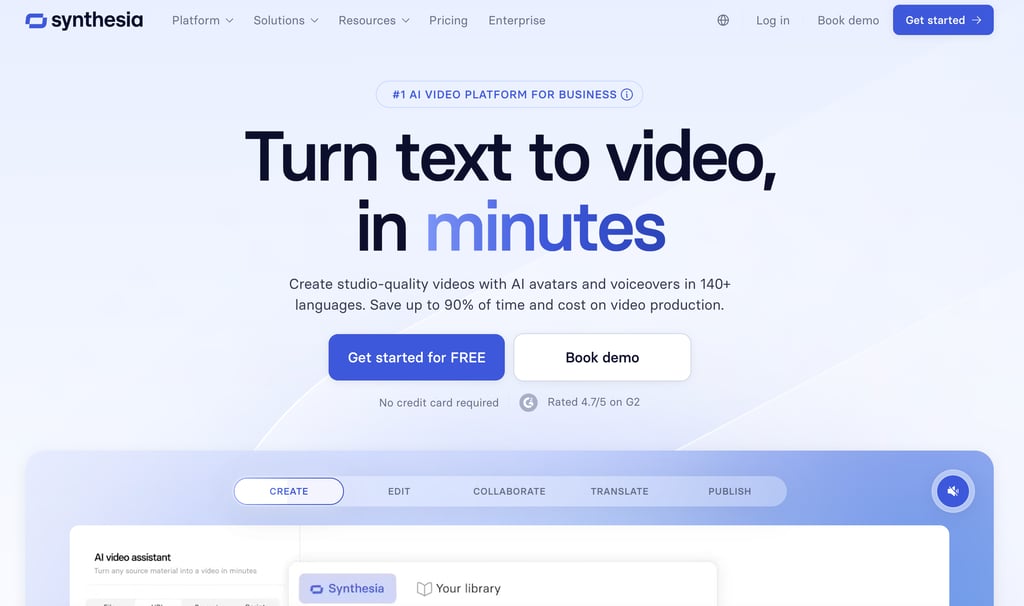
Synthesia is an AI video generation platform that creates videos with AI avatars. Instead of filming yourself or hiring actors, you use digital presenters that look and sound human. The platform leverages artificial intelligence and large language models to power its deep learning architecture, enabling remarkably realistic avatar models and lip-synced speech.
How it works:
Choose an AI avatar (140+ options: male, female, various ages, ethnicities, styles)
Write or paste your script
Select voice, language, and tone
Add slides, images, videos, and text overlays
Generate your video (takes 5-15 minutes)
Download and publish
Think of it like this:
Traditional video = Hire actor, set up camera, film, edit (hours/days)
Synthesia = Type script, click generate (10 minutes)
Main features:
140+ photorealistic AI avatars
120+ languages and accents
Custom avatar creation (upload your own face)
Video templates (training, explainers, ads)
Screen recording integration
Voiceover customization
Collaboration tools for teams
Who uses it:
Corporate training teams (onboarding, compliance, product demos)
Marketing agencies (explainer videos, ads, social content)
E-learning creators (online courses, tutorials)
HR departments (internal communications, announcements)
Sales teams (personalized video messages)
Synthesia is best for professional, script-based video content. It's not for vlogs, casual content, or anything requiring genuine human emotion. But for corporate training videos, explainers, and educational content? It's a game-changer.
Key Features (What Can It Actually Do?)
Let me walk you through the features that matter most.
1. AI Avatars (140+ Realistic Digital Presenters)
This is Synthesia's core feature. You choose from 140+ pre-built avatars that look like real people.
Avatar variety:
Gender: Male and female options
Age: Young, middle-aged, older presenters
Ethnicity: Diverse representation (Asian, Black, White, Latino, Middle Eastern, etc.)
Style: Professional (business attire), casual (t-shirts), creative (artistic looks)
Poses: Seated, standing, upper body, full body
Quality:
Photorealistic (not cartoon-like)
Natural micro gestures and movements
Realistic eye contact and head movements
Lip-sync matches the audio perfectly
My take: The avatars look impressively real. Not 100% indistinguishable from humans (you can tell they're AI if you look closely), but good enough that most viewers won't notice or care. They're miles ahead of older AI avatars from 2022-2023.
Use cases:
Corporate training videos (professional avatar in business attire)
Product demos (friendly, casual avatar)
Multilingual content (same avatar speaking 10 different languages)
Rating: 9/10 — Best AI avatars I've seen.
2. Custom Avatars (Clone Yourself or Create Branded Presenters)
Synthesia's premium plans let you create custom avatars — digital versions of yourself or your team.
How it works:
Record yourself speaking for 5-10 minutes (following Synthesia's guidelines)
Upload the video to Synthesia
They process it (takes 1-2 weeks)
You get a custom avatar that looks and sounds like you
What you can do with custom avatars:
Create training videos "presented by you" without filming
Scale personal video messages (sales, customer support)
Maintain brand style consistency (your company spokesperson)
Generate content in multiple languages using your face
Quality:
80-90% similarity to your real appearance
Voice is cloned (sounds like you)
Gestures and expressions match your recording
Cost:
Custom avatar creation: $1,000+ one-time fee (Enterprise plan)
Or included in higher-tier plans
My take: Custom avatars are powerful for businesses that need brand consistency or executives who want to scale their presence. Not necessary for most individual creators.
Rating: 8/10 — Impressive but expensive.
3. Multilingual Support (120+ Languages)
Synthesia supports 120+ languages, and your avatar can speak all of them. This multilingual delivery capability is one of the platform's strongest features for global businesses.
How it works:
Write your script in English
Translate it (manually or using AI like ChatGPT)
Paste the translated script into Synthesia
Your avatar speaks it with proper accent and pronunciation
Languages supported:
Major languages: English, Spanish, French, German, Italian, Portuguese, Mandarin, Japanese, Korean, Arabic, Hindi, Russian
Regional accents: US English, UK English, Australian English, etc.
120+ total languages and dialects with comprehensive language support
Use cases:
Global training programs (translate once, deploy everywhere)
International marketing campaigns
Multilingual e-learning courses
Localized customer support videos
My experience (from research): Users report that pronunciation and accents are surprisingly good for major languages. Minor languages can sound slightly robotic but are still understandable.
Rating: 9/10 — Best multilingual video tool available.
4. Video Templates (Pre-Built Layouts for Common Use Cases)
Synthesia includes 60+ video templates designed for specific use cases.
Template categories:
Corporate training: Onboarding, compliance, product training
How-to guides: Step-by-step tutorials, explainers
Marketing: Product demos, ads, announcements
HR & internal comms: Company updates, policy changes
Sales: Personalized outreach, proposals
What's included in templates:
Pre-designed slide layouts
Text and image placeholders
Transitions and animations
Music tracks (royalty-free)
How to use them:
Select a template
Replace placeholder text with your script
Swap images/videos with your content
Customize colors and branding
Generate video
My take: Templates save 20-30 minutes per video. They're professional-looking and cover 80% of business use cases. Great for non-designers.
Rating: 8/10 — Very useful for beginners and teams.
5. Screen Recording Integration
Synthesia can combine AI avatars with screen recordings — perfect for software demos and tutorials.
How it works:
Record your screen (using Synthesia's built-in recorder or upload)
Add an AI avatar in a small window (picture-in-picture)
Avatar narrates the screen recording
Generate final video
Use cases:
Software tutorials (avatar explains while showing screen)
Product demos (avatar walks through features)
Training videos (avatar guides through process)
My take: This is a killer feature for SaaS companies and course creators. You get professional narration without recording yourself.
Rating: 9/10 — Unique and powerful.
6. Voice Customization
You can adjust how your avatar speaks.
Customization options:
Speed: Slow, normal, fast
Pitch: Higher or lower voice
Emphasis: Bold or italicize words for emphasis
Pauses: Add breaks between sentences
Tone: Friendly, professional, enthusiastic
How to use it:
Type your script
Bold words you want emphasized
Add commas and periods for natural pauses
Select voice speed and pitch
My experience (from research): Users say the voice customization is good but not as advanced as dedicated AI voice tools like ElevenLabs. For most use cases, it's fine.
Rating: 7/10 — Decent but not best-in-class.
7. Collaboration Tools (For Teams)
Synthesia includes team features for agencies and enterprise users.
Features:
Shared workspace (multiple team members)
Role-based permissions (admin, editor, viewer)
Comments and feedback on videos
Approval workflows
Brand kits (logos, colors, fonts)
Use cases:
Marketing teams creating content together
Training departments with multiple contributors
Agencies managing client projects
Rating: 8/10 — Great for teams, unnecessary for solo creators.
Pricing Plans: What Does It Actually Cost? (2026)
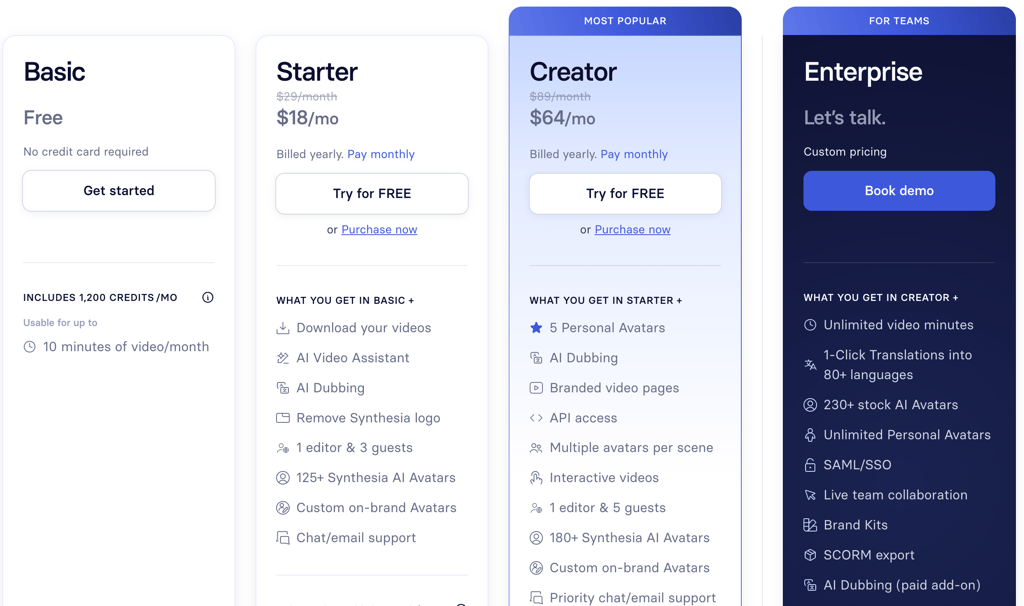
Synthesia's 2026 pricing is based on video minutes per month and avatar access. Annual billing saves 30-38% compared to monthly.
Pricing Breakdown (January 2026)
Free / Basic Plan:
Price: $0
Video minutes: ~3 minutes/month
Stock avatars: 9
Languages: 140+
Key features: 60+ templates, screen recorder, image/video uploads, watermarked videos
Best for: Testing and exploring Synthesia
Starter Plan:
Monthly: $29/month
Annual: $18/month (billed yearly at ~$216/year)
Video minutes: 10 minutes/month (~120/year)
Stock avatars: 125+
Personal/custom avatars: 3 (included on annual)
Languages: 140+
AI dubbing: Included (deducted from minutes)
Key features: Downloads (MP4 Full HD), remove logo, auto-captions, branded share page, 1 editor + 3 guests, PowerPoint import
Best for: Small teams, occasional professional videos
Creator Plan: MOST POPULAR
Monthly: $89/month
Annual: $64/month (billed yearly at ~$768/year)
Video minutes: 30 minutes/month (~360/year)
Stock avatars: 180+
Personal/custom avatars: 5
Languages: 140+
AI dubbing: Included
Key features: API access, interactive videos (quizzes/CTAs), multiple avatars per scene, live collaboration, priority support, brand kits, custom fonts, royalty-free premium assets (Getty), SCORM export
Best for: Regular creators, growing teams (5-10+ videos/month)
Enterprise Plan:
Price: Custom (contact sales)
Video minutes: Unlimited
Stock avatars: 230+ (full library)
Personal/custom avatars: Unlimited (fair use; Studio Express add-on $1,000/year for premium quality)
Languages: 140+ (1-click translations in 80+)
Key features: SSO/SAML, dedicated customer success manager, tailored onboarding, priority 24/7 support, enterprise content moderation, SOC 2/GDPR compliance, implementation services
Best for: Large organizations, high-volume/global teams
Important notes:
Annual billing saves 30-38% compared to monthly
Credits are shared for AI features (video + dubbing); unused credits don't roll over
Add-on: Premium Studio Avatars $1,000/year (annual plans only)
Free trial available with no credit card required
Currency: Pricing shown in USD (some regions may show £ equivalent)
My Pricing Recommendation:
If you're testing: Free plan gives you 3 minutes to evaluate quality
If you create 5-10 videos/month: Starter plan ($18-29/mo) works for occasional use
If you create 10-20 videos/month: Creator plan ($64-89/mo) is the sweet spot for regular production
If you need unlimited videos or custom avatars: Enterprise plan makes sense for large organizations
Don't overpay: Most individual creators and small teams are fine with Starter or Creator. Only upgrade to Enterprise if you need unlimited minutes or custom avatar creation.
Pros and Cons (The Honest Truth)
Let me give you the real talk on what's great and what's not.
Pros
1. No camera, no filming required Create professional video content without appearing on camera. Perfect for camera-shy creators or executives who don't have time to film.
2. Multilingual at scale Create one video, translate the script, generate in 10 languages. This is nearly impossible to do with real actors.
3. Fast production What would take days with traditional video production takes 10-15 minutes with Synthesia. The video generation speed is genuinely impressive.
4. Consistent quality Every video looks professional. No bad lighting, no audio issues, no retakes needed.
5. Cost-effective at scale If you need 20+ videos per month, Synthesia is cheaper than hiring videographers or actors.
6. Avatars look realistic 140+ photorealistic avatars cover most demographics and styles.
7. Great for corporate training HR, compliance, and onboarding videos are perfect use cases. Professional, scalable, consistent.
Cons
1. Expensive for casual users $18-64/month is pricey if you only make 1-2 videos per month. Traditional filming might be cheaper.
2. Avatars lack genuine emotion They look real, but you can tell they're not human. Subtle emotional nuance is missing.
3. Not ideal for personal content Vlogs, personal stories, or anything requiring authentic emotion won't work. This is for professional, scripted content only.
4. Annual billing required No monthly payment option. You're locked in for a year.
5. Custom avatars are expensive $1,000+ per custom avatar (Enterprise only). Out of reach for most individuals.
6. Minute limits on lower plans 120 minutes/year = only 10 mins/month. Easy to max out if you create longer videos.
7. Learning curve Not as intuitive as it looks. Takes 1-2 hours to learn the interface and templates.
Overall Assessment:
Synthesia is excellent for businesses and professional content creators who need scalable, multilingual video production. It's not ideal for casual creators, vloggers, or anyone needing authentic human emotion.
If you're creating training videos, explainers, or marketing content at scale, Synthesia is worth every penny. If you're making personal YouTube videos, stick with a real camera.
Rating: 4.5/5 stars
Who Should Use Synthesia?
Let me break down who gets the most value.
Perfect For:
Corporate training departments Create onboarding, compliance, and product training videos at scale. Consistent quality, multilingual support, easy updates.
Marketing teams (B2B/SaaS) Generate explainer videos, product demos, and ad variations quickly. Test multiple versions without expensive reshoots. Great for content marketing and digital marketing campaigns.
E-learning & course creators Create professional course videos without filming. Focus on content, let Synthesia handle presentation. One of the top content creation platforms for education.
HR & internal communications Company updates, policy announcements, benefits explanations. Professional videos without executive time investment.
Global businesses Need multilingual content? Synthesia is unbeatable. Same video in 10+ languages with perfect lip-sync.
Sales teams (at scale) Personalized video messages for prospects. Same script, customized with names/details.
Maybe For:
Small business owners If you need occasional professional videos (explainers, testimonials, ads), Synthesia works. But it's expensive for light use.
YouTubers (educational channels) If your channel is educational and you're camera-shy, Synthesia could work. But audiences prefer real people for personal connection.
Course creators (budget-conscious) Synthesia is pricey for solo creators. Consider alternatives like Descript (real you) or lower-cost options first.
Not Ideal For:
Vloggers & personal content creators Audiences want to connect with real people. AI avatars don't work for vlogs, personal stories, or casual content.
Filmmakers & creative video producers If you need cinematic quality, emotion, or artistic expression, use real actors and traditional production.
Casual users (1-2 videos/year) $264/year minimum is too expensive for occasional use. Hire a freelancer on Fiverr instead.
Synthesia vs Competitors
How does Synthesia compare to alternatives?
Synthesia vs HeyGen (Top Competitor)
Feature Synthesia HeyGen Winner Avatar Quality Photorealistic Photorealistic Tie Languages 120+ 40+ Synthesia Custom Avatars Yes (Enterprise) Yes (cheaper) HeyGen Templates 60+ 30+ Synthesia Pricing $22-67/mo $24-99/mo Synthesia Ease of Use Moderate Easier HeyGen Best For Enterprise/Corporate Creators/Small Biz Depends
My take: Synthesia wins for enterprise/corporate use. HeyGen wins for individual creators and small businesses.
Synthesia vs D-ID
D-ID:
Cheaper ($5-50/mo)
Lower quality avatars
Fewer features
Synthesia:
More expensive
Photorealistic avatars
Full production suite
Winner: Synthesia (unless budget is tight)
Synthesia vs Real Filming (Traditional Video)
My take: Use Synthesia for scalable, professional content. Use real filming for authentic, emotional content.
Real-World Use Cases
Let me show you how businesses use Synthesia.
Use Case 1: Corporate Training (HR Department)
Scenario: Company with 5,000 employees needs quarterly compliance training in 8 languages.
Traditional approach:
Hire videographer ($2,000)
Hire actors for 8 languages ($8,000)
Post-production ($2,000)
Total: $12,000 per quarter
Synthesia approach:
Write script once
Translate to 8 languages (using ChatGPT)
Generate 8 videos in Synthesia (2 hours)
Total: $804/year (Creator plan)
Savings: $47,196/year
Use Case 2: E-Learning Course (Solo Creator)
Scenario: Course creator making 50 lecture videos for online course.
Traditional approach:
Film yourself (10 hours of recording)
Edit 50 videos (30 hours)
Total: 40 hours of work
Synthesia approach:
Write scripts for 50 lectures
Generate 50 videos with AI avatar (10 hours including script writing)
Total: 10 hours of work
Time saved: 30 hours
Use Case 3: Marketing Agency (Client Videos)
Scenario: Agency creates explainer videos for 10 clients per month.
Traditional approach:
Hire videographer for each project ($500 × 10 = $5,000/month)
Or hire in-house videographer ($60k/year salary)
Synthesia approach:
Creator plan: $67/month
Generate unlimited videos (within 360 mins/year)
Savings: ~$4,900/month
Getting Started with Synthesia
Ready to try it? Here's how to start.
Step 1: Sign Up
Click "Get Started"
Sign up with email or Google
Choose Starter or Creator plan
Enter payment info (14-day free trial available)
Step 2: Choose a Template or Start Blank
Click "New Video"
Select a template (or start from scratch)
Customize layout, colors, and branding
Step 3: Write Your Script
Add text boxes for your script
Keep sentences short and clear (AI reads them aloud)
Add emphasis with bold text
Break into sections with slide breaks
Step 4: Select Your Avatar
Browse 140+ avatars
Filter by gender, age, ethnicity, style
Preview how they look and sound
Select your favorite
Step 5: Generate Video
Click "Generate"
Wait 5-15 minutes (depending on video length)
Review the result
Make edits if needed
Re-generate (iterations are fast)
Step 6: Download and Publish
Download as MP4 (1080p or 4K)
Upload to YouTube, Vimeo, LMS, etc.
Pro tip: Start with templates. They're pre-optimized and save you design time.
Final Verdict: Is Synthesia Worth It?
Yes — if you create professional, script-based video content at scale.
Synthesia is the best AI video tool available in 2026. It's perfect for corporate training videos, marketing explainers, e-learning, and multilingual content. The time and cost savings are undeniable. Among AI marketing tools and automation tools for video creation, it stands in a class of its own.
Here's my bottom line:
If you need 5+ professional videos per month, Synthesia will save you hundreds of hours and thousands of dollars annually.
If you create 1-2 videos per month, the cost ($264-804/year) might not justify the subscription. Consider hiring freelancers instead.
Who Gets the Most Value:
Starter plan ($22/mo) is perfect for:
Small teams testing Synthesia
Occasional video needs (2-3 per month)
Creator plan ($67/mo) is worth it for:
Regular content creators (5-10 videos/month)
E-learning course creators
Marketing teams
Enterprise (custom pricing) makes sense for:
Large corporations with high video needs
Global companies needing multilingual content
Teams wanting custom avatars
The Bottom Line:
Rating: 4.75/5 stars
Synthesia isn't perfect (avatars lack genuine emotion, pricing is steep for casual users), but it's the best AI video tool for professional, scalable content creation. If you're camera-shy, need multilingual videos, or want to scale video production without hiring actors, Synthesia is worth every penny.
I recommend starting with the Starter plan to test it. If you max out your minutes, upgrade to Creator. Most businesses will see ROI within 1-2 months.
Related Posts: