Murf AI Review 2026: Professional AI Voiceovers for Content Creators
Murf AI review for 2026. Is this AI voice generator worth it? In-depth look at text to speech features, voice cloning, pricing, pros & cons, plus comparisons to ElevenLabs and Amazon Polly.
2/11/202610 min read
Murf.ai Review 2026: Professional AI Voiceovers for Content Creators
Full disclosure: This post contains affiliate links. If you sign up through them, I may earn a commission at no extra cost to you. Prices and features are current as of January 2026, based on official sources.
What Is Murf.ai?
Murf AI is an AI voice generator and text to speech platform that creates studio-quality voiceovers from text using advanced artificial intelligence. Instead of hiring voice actors or recording yourself, you type your script and Murf converts it to natural-sounding speech in minutes using voice synthesis technology powered by neural networks and deep learning algorithms.
Developed by Murf Software Solutions Pvt Ltd, the platform offers 120+ AI voice models across 20+ languages with multilingual support, making it ideal for YouTube videos, podcasts, e-learning courses, advertisements, IVR Voices, and corporate presentations. Whether you need a friendly narrator, professional spokesperson, or character voice, Murf AI has synthetic voices for every need.
How it works:
Type or paste your script
Choose from 120+ voice generators
Customize pitch, speed, and voice modulation
Preview and edit for pronunciation accuracy
Download high-quality audio files or video
Think of it like this:
Traditional voiceover: Hire voice actors ($100-500+), schedule recording, wait for delivery
Murf AI: Type script, select AI generated voice, download in minutes ($0-99/month)
Main features:
120+ AI voices in 20+ languages with multilingual output
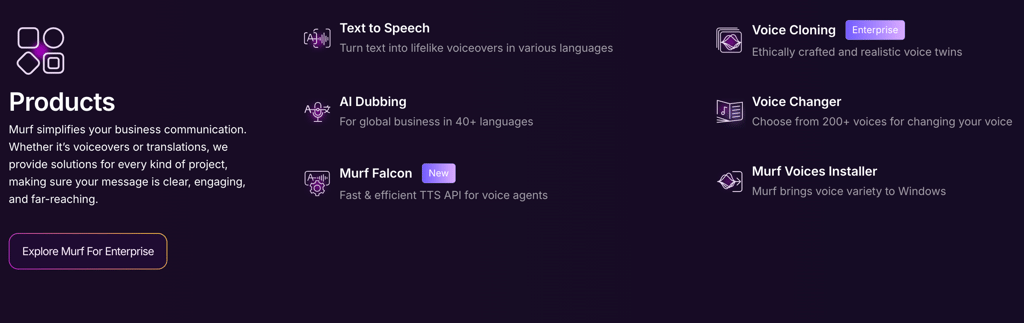
Voice cloning (create custom synthetic voices)
Built-in video editor with video timeline
Team collaboration
API access and TTS API for developers
Commercial usage rights
Murf Falcon voice gen model for enhanced quality
Who uses it:
YouTubers and digital creators adding narration to videos
Course creators building e-learning content
Marketers creating training & marketing voiceovers
Podcasters generating intros and outros
Corporate teams making training materials
Audiobook and Kindle eBooks producers
Businesses needing IVR Voices for phone systems
AI voice agents for customer service automation
Murf AI is best for content creators who need consistent, professional AI voiceovers without the cost or hassle of traditional voice actors.
Key Features (What Can It Actually Do?)
1. AI Voice Generation (Text to Speech)
This is Murf's core feature as a leading AI voice generator. Convert any text to natural-sounding speech with realistic AI generated voice output using generative AI and machine learning technology.
How it works:
Paste your script into the editor
Select a voice from the voice generators library
Murf generates audio files instantly using speech synthesis
Preview and make adjustments
Download as MP3, WAV, or other audio files formats
Voice options:
Male and female synthetic voices
Various ages (young, middle-aged, senior)
Multiple accents (American, British, Australian, Indian, etc.)
Different voice Styles (conversational, professional, energetic, calm)
Quality:
Natural-sounding speech with good intonation
Better than basic text to speech tools
Uses neural networks for realistic output
Good enough for most professional use cases
My take: The voice quality is solid for the price. The AI voice models won't fool anyone into thinking it's human, but it's professional enough for YouTube, courses, and marketing content. The user experience is smooth and intuitive.
Rating: 8/10 — Quality voices at accessible pricing.
2. Voice Library (120+ Options)
Murf offers one of the largest AI voice generator libraries available with diverse AI voice models.
What's included:
120+ voices total across multiple voice generators
20+ languages with multilingual support
Multiple accents per language
Various voice Styles and tones
New synthetic voices added regularly
Murf Falcon - their latest voice gen model for premium quality
Popular voices:
"Marcus" - Professional male narrator
"Julia" - Friendly female voice
"Ken" - Energetic male voice
"Sarah" - Warm conversational tone
Language support with multilingual output:
English (US, UK, Australian, Indian)
Spanish, French, German, Italian
Portuguese, Dutch, Polish
Hindi, Arabic, Japanese, Korean
And more...
My take: The variety of voice generators is impressive. Whatever AI generated voice type you need, Murf AI probably has it. The multilingual support is great for global content and international digital creators.
Rating: 9/10 — Excellent voice variety.
3. Voice Cloning
Create a custom AI voice based on your own voice samples and recordings.
How it works:
Record voice samples (minimum required)
Upload to Murf AI
Machine learning trains on your voice
Generate new audio files in your voice using voice synthesis technology
Use cases:
Digital creators who want their own voice at scale
Brands with specific spokesperson voice
Maintaining consistency across large projects
Creating voice avatars for virtual presentations
Requirements:
Available on higher plans
Requires quality recordings with good pronunciation accuracy
Training takes some time using deep learning algorithms
My take: Voice cloning is powerful but requires effort to set up. Great for creators who want consistency without recording every script manually. The neural networks powering this feature deliver impressive results.
Rating: 7/10 — Powerful feature with setup requirements.
4. Built-in Video Editor
Murf includes a video editor for video creation to sync voiceovers with visuals using the video timeline.
Features:
Import video or images as video assets
Sync voiceover with video timeline
Add background music and stock music
Include subtitles for accessibility
Export complete videos
Video synchronization tools
How to use:
Create voiceover in Murf AI
Upload your video footage
Align audio files with visuals on the video timeline
Add stock music and captions
Export finished video
Integration with other tools:
Works with Google Slides presentations
Compatible with Google Docs scripts
Export for use in other video editors
My take: The video editor is basic but functional for video creation. Good for simple projects. For complex editing, you'll still want dedicated software like Descript or Premiere. Watch our video tutorial for tips.
Rating: 6/10 — Nice addition but basic.
5. Pronunciation and Emphasis Controls
Fine-tune how the AI generated voice speaks your script for better pronunciation accuracy.
Features:
Adjust pitch (higher/lower) with voice modulation
Control speed (faster/slower)
Add pauses between sentences
Emphasize specific words
Custom pronunciation for names/terms using pronunciation libraries
SSML markup support for advanced control
How it helps:
Make speech synthesis sound more natural
Correct mispronounced words
Add dramatic effect where needed
Match pacing to video timeline
My take: These controls are essential for professional results. The difference between default output and tuned output is significant for the overall user experience.
Rating: 8/10 — Important for quality output.
6. API Access and TTS API
Integrate Murf AI's voice generators into your own applications using the TTS API.
Features:
RESTful API access
Multiple audio files output formats
Batch processing for automation tools
Low latency for voice agents
Documentation and support
Use cases:
Building AI voice agents for customer service
Integrating text to speech into apps
Automating voiceover production
Creating voice avatars for interactive experiences
AWS cloud deployment options
Rating: 7/10 — Solid developer features.
7. Team Collaboration
Work with team members on voiceover projects.
Features:
Multiple user seats
Shared projects
Role-based permissions
Centralized billing
Brand voice consistency
Best for:
Marketing agencies
Corporate teams
Content studios
E-learning companies
Rating: 7/10 — Solid team features.
Pricing Plans: What Does It Actually Cost?
Murf AI uses a time-based pricing structure (minutes of voice generation per month).
Pricing Breakdown (January 2026)
Free Trial:
Price: $0
Time: 10 minutes total (one-time, non-recurring)
Voices: Access to basic voices (32-60)
Downloads: Limited, some watermarked
Commercial rights: No
Best for: Testing voice quality and AI voice models
Creator Plan:
Monthly: $19/month
Annual: ~$15-16/month (billed yearly)
Time: 24 hours/year (~2 hours/month)
Voices: 200+ AI voices in 30+ languages
Features: Unlimited downloads, commercial rights, pronunciation library, voice styles, integrations (Canva, Google Slides, Google Docs), 100 projects
Users: 1
Best for: Solo digital creators, YouTubers, podcasters
Business Plan:
Monthly: $66/month
Annual: $792/year (~$66/month billed annually)
Time: 96 hours/year voice generation + 48 hours transcription
Voices: 200+ with advanced controls
Features: Everything in Creator, plus emphasis/variability controls, "Say It My Way," business license, PowerPoint integration, audio-to-text, priority customer support, 500 projects
Users: Multiple editors with collaboration
Best for: Small teams, agencies, higher-volume creators
Enterprise Plan:
Pricing: Custom (contact sales, typically $900+/year starting)
Time: Unlimited or high-volume custom
Features: Everything in Business, plus unlimited projects, multiple seats, AI translation, custom voice clones, SSO, dedicated support, security reviews, broadcasting rights, custom integrations
Best for: Large organizations, enterprise security/compliance
Additional Notes:
Pricing is time-based (minutes/hours of generated audio files)
No rollover of unused minutes
API pricing: ~$0.03 per 1,000 characters (~1 cent per minute)
Commercial rights included on all paid plans
200+ ultra-realistic synthetic voices with MultiNative for natural multilingual output
My Pricing Recommendation:
If you're testing: Free trial gives 10 minutes - enough to evaluate voice quality
If you create 2-4 videos/month: Creator plan ($19/mo) is perfect for solo digital creators
If you're a team or need advanced features: Business plan ($66/mo) adds collaboration and priority support
Watch your hours: 24 hours/year (~2 hours/month) covers most individual creators, but track usage for long-form content.
Customer Support
Murf AI provides customer support through multiple channels:
Email support for all users
Priority customer support for Business and Enterprise plans
Help center with documentation and video tutorial guides
Community resources for digital creators
The customer support team is responsive, typically answering within 24-48 hours. Enterprise customers get dedicated support.
Pros and Cons (The Honest Truth)
Pros
1. Large voice library 120+ voice generators and AI voice models means variety for every project type and tone.
2. Good voice quality Natural-sounding speech synthesis output that works for professional content using neural networks.
3. Multilingual support 20+ languages with multilingual output makes it great for global digital creators.
4. Built-in video editor Sync voiceovers with visuals using the video timeline without leaving the platform for video creation.
5. Pronunciation controls Fine-tune output with voice modulation and pronunciation libraries for natural-sounding speech results.
6. Commercial usage rights Use AI generated voice audio files in monetized content on all paid plans.
7. Affordable pricing structure $19-29/month is accessible for most digital creators.
8. TTS API for developers Integrate voice generators into your own automation tools and applications.
Cons
1. Not the most realistic voices ElevenLabs sounds more human. Murf AI is good but not best-in-class for synthetic voices.
2. Time-based limits 2 hours/month on Creator plan can run out with long-form content and large audio files.
3. Free trial is limited Only 10 minutes total - not a true free tier.
4. Voice cloning requires Business plan Need $79+/mo to access custom voice synthesis technology features.
5. Video editor is basic Functional but not a replacement for dedicated video creation software.
6. Learning curve for best results Getting natural-sounding speech requires tweaking pronunciation accuracy and emphasis.
Overall Assessment:
Murf AI delivers solid AI voiceovers using artificial intelligence at reasonable prices. It's not the most realistic option available (ElevenLabs wins there with their machine learning), but it offers better value for digital creators on a budget who need variety and multilingual support.
Rating: 4.2/5 stars
Who Should Use Murf.ai?
Perfect For:
YouTubers and video creators Add professional AI generated voice narration without recording yourself. Great for tutorials, explainers, and educational content. The video creation tools help streamline your workflow.
Course creators and educators Build e-learning content with consistent voiceovers. Multilingual support helps reach global students. Export to Google Slides or create video tutorial content.
Marketers and advertisers Create training & marketing voiceovers and promotional videos quickly. Commercial rights included on paid plans.
Corporate teams Produce training videos, presentations, and internal communications at scale using automation tools.
Podcasters Generate intros, outros, and ad reads with consistent voice quality.
Audiobook and Kindle eBooks producers Narrate books and long-form content with AI voice models (watch the time limits on audio files).
Developers building voice agents Use the TTS API to create AI voice agents and customer service automation tools.
Maybe For:
Creators needing ultra-realistic synthetic voices Murf AI is good but not the most realistic. Consider ElevenLabs if realism is critical.
Light users (1-2 projects/month) The free trial might be enough, but no ongoing free tier limits casual use.
Not Ideal For:
Voice actors or singers Murf doesn't replicate singing or highly emotive performance with its voice generators.
Those needing unlimited generation Time limits mean heavy users will face overages or need Enterprise pricing structure.
Real-time applications Murf AI is designed for pre-recorded content, not live speech synthesis.
Murf.ai vs Competitors
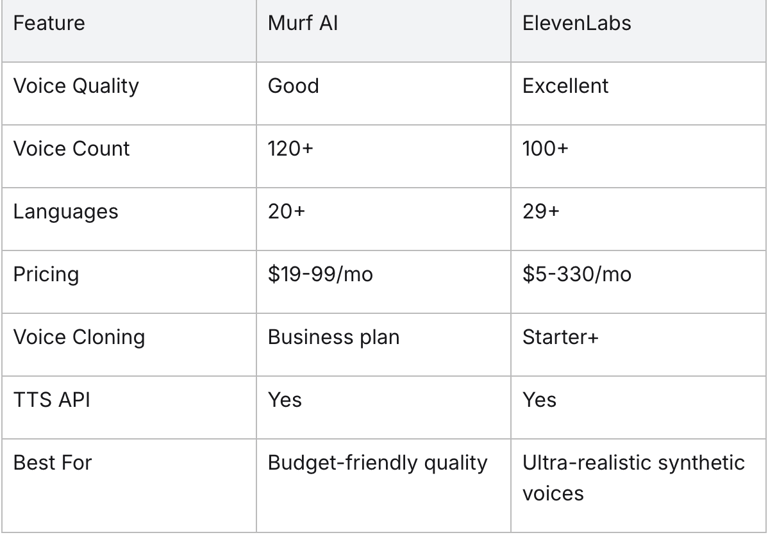
Murf.ai vs ElevenLabs
My take: ElevenLabs sounds more realistic with their machine learning. Murf AI is more affordable with good voice quality. Choose based on budget vs. quality priority.
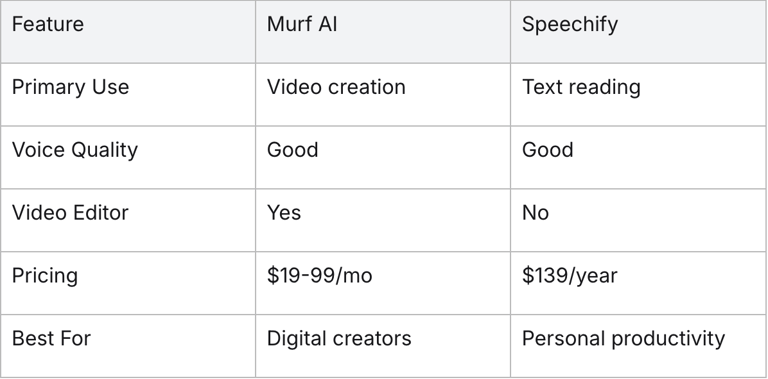
Murf.ai vs Speechify
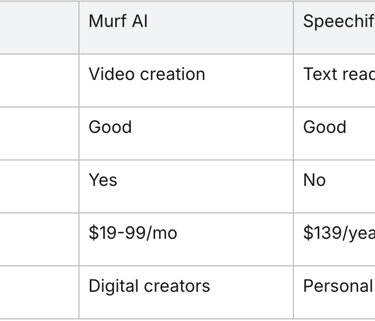
My take: Different tools for different purposes. Murf for creating content, Speechify for consuming content.
Real-World Use Cases
Use Case 1: YouTube Educational Channel
Scenario: Digital creator making 2 video tutorial videos per week
Before Murf AI:
Recording voiceovers: 2-3 hours per video
Re-recording mistakes: Adds 30-60 minutes
Audio editing: 1 hour per video
After Murf AI:
Generate AI generated voice: 15-20 minutes
Fine-tuning voice modulation: 10-15 minutes
Total time saved: 3+ hours per video
Creator plan ($19/mo) easily covers audio files usage
Use Case 2: E-Learning Company
Scenario: Team creating course content in multiple languages needing multilingual output
Before Murf AI:
Hiring voice actors: $200-500 per language per module
Coordination: Weeks of scheduling
Consistency: Different voices across languages
After Murf AI:
Generate all languages in-house with multilingual support
Same-day turnaround
Consistent voice quality across languages
Business plan ($79/mo) vs. thousands in talent fees
Use Case 3: Marketing Agency
Scenario: Creating training & marketing voiceovers for multiple clients
Before Murf AI:
Stock voiceover licenses: $50-100 per video
Limited variety
Usage restrictions
After Murf AI:
Unlimited variety with 120+ voice generators
Full commercial rights for AI generated voice content
Quick iterations for client feedback
Business plan covers team needs for video creation
Getting Started with Murf.ai
Step 1: Sign Up
Go to Murf.ai
Sign up with email or Google
Access free trial (10 minutes)
Step 2: Create a Project
Click "Create Project"
Choose video creation or audio-only
Name your project
Step 3: Add Your Script
Type or paste your script
Break into logical paragraphs
Review for errors
Import from Google Docs if needed
Step 4: Select an AI Voice
Browse the voice generators library
Filter by gender, age, accent, voice Styles
Preview AI voice models with your script
Select the best fit for your audio files
Step 5: Fine-Tune
Adjust speed and pitch with voice modulation
Add pauses where needed
Emphasize key words
Fix pronunciation accuracy issues using pronunciation libraries
Step 6: Generate and Download
Click generate using the text to speech engine
Preview the full AI generated voice
Make final adjustments
Download audio files in preferred format (MP3, WAV, etc.)
Or export complete video with video timeline
Pro tip: Start with a short script to find the right synthetic voices and settings before generating long-form content.
Final Verdict: Is Murf.ai Worth It?
Yes — if you need reliable, affordable AI voiceovers with good variety from a quality AI voice generator.
Murf AI sits in a sweet spot between budget options (that sound robotic) and premium tools (that cost more). It's not the most realistic text to speech platform available, but it delivers professional-quality natural-sounding speech at prices most digital creators can afford.
The bottom line:
If you create 2+ videos per month with voiceovers, Murf AI will save you time and money compared to recording yourself or hiring voice actors. The Creator plan at $19-29/month pays for itself quickly.
If you need ultra-realistic synthetic voices, ElevenLabs is worth the premium. But for most use cases — YouTube, courses, training & marketing voiceovers — Murf delivers with solid voice quality.
If you rarely need voiceovers, the 10-minute free trial probably isn't enough. Consider ElevenLabs' free tier or other voice generators with ongoing free plans.
Who Gets the Most Value:
Free trial is good for:
Testing voice quality and AI voice models
One-off small projects
Creator plan ($19-29/mo) is worth it for:
Individual digital creators making regular content
YouTubers, podcasters, course creators needing audio files
Business plan ($79-99/mo) makes sense for:
Teams needing multiple seats
Anyone requiring voice cloning with voice synthesis technology
Higher volume production and TTS API access
The Bottom Line:
Rating: 4.2/5 stars
Murf AI is a solid mid-tier AI voice generator using artificial intelligence and neural networks. It doesn't have the most realistic synthetic voices (ElevenLabs wins there with deep learning algorithms), but it offers great variety, multilingual support, and accessible pricing structure. For most digital creators, it's the practical choice for text to speech and video creation.
Start with the free trial and see if the voice quality meets your needs. If you like what you hear from the AI voice models, the Creator plan offers excellent value.
Related Posts: