vidIQ Review 2026: Best YouTube SEO Tool? Pricing & Features
Is vidIQ worth $16/month? Honest review of features, pricing, AI tools, and how it compares to TubeBuddy. Plus pros/cons from real users.
1/18/202614 min read
vidIQ Review 2026: Best YouTube SEO Tool? Pricing & Features
Affiliate Disclosure
This post contains affiliate links. If you make a purchase through one of these links, I may earn a commission at no extra cost to you. I only recommend tools I've personally tested or thoroughly researched.
Growing a YouTube channel in 2026 feels impossible without the right tools. You're competing with millions of creators, the algorithm is a black box, and you're basically guessing at what titles, thumbnails, and keywords will actually work.
That's where vidIQ comes in. It's a YouTube analytics and optimization tool that promises to help you rank higher, get more views, and grow your subscriber count faster. I've been using vidIQ for the past few weeks to see if it actually delivers on those promises.
The short answer? It's powerful but not perfect. If you're a data-driven creator who wants to understand the "why" behind your views (or lack of them), vidIQ is incredibly valuable. But if you're a beginner expecting instant growth, you might be disappointed.
Let me break down exactly what vidIQ does, what it costs, and whether it's worth your money.
What is vidIQ?
vidIQ is a comprehensive YouTube analytics and SEO optimization platform that helps creators grow their channels faster. Think of it as your YouTube data analyst, keyword researcher, and competitor spy all rolled into one tool.
Founded as a YouTube-first tool, vidIQ has evolved into one of the most popular growth platforms for creators in 2026. It integrates directly with YouTube through a browser extension, giving you real-time insights and optimization suggestions right on the platform.
The core idea is simple: YouTube success isn't luck—it's data. vidIQ helps you understand:
What keywords your audience is searching for
How your competitors are beating you
Which of your videos have the most growth potential
What's working (and what's not) in your niche
It's used by everyone from beginner creators with 100 subscribers to established YouTubers with millions of followers. The platform has become essential for anyone serious about YouTube growth.
Main capabilities:
Keyword research with search volume and competition data
Competitor tracking to see what's working for others
AI-powered suggestions for titles, thumbnails, and content ideas
Real-time analytics on video performance
Content optimization tools to improve rankings
What sets vidIQ apart from generic analytics tools is its YouTube-specific focus. It's not trying to track Instagram or TikTok—it's laser-focused on helping you win on YouTube.
Key Features (What Can It Actually Do?)
Let me walk you through the features that matter most for growing your channel. I've tested all of these personally, so I'll tell you what works and what's overhyped.
1. Keyword Research & SEO Tools
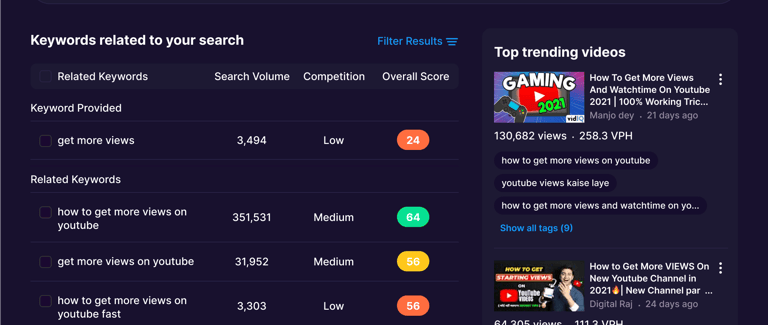
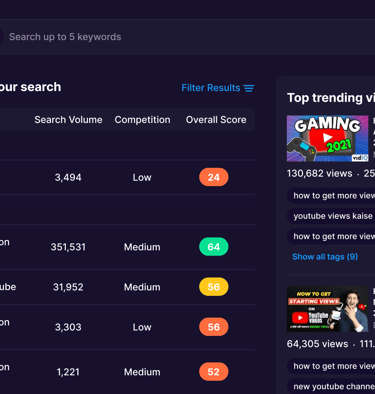
This is vidIQ's bread and butter. The keyword research tool helps you find exactly what people are searching for on YouTube.
How it works:
Type a keyword or video topic
vidIQ shows search volume, competition level, and related keywords
You get an "optimization score" for your titles, tags, and descriptions
Suggestions for high-opportunity keywords you're missing
My experience: I used this to research keywords for a tutorial video. vidIQ suggested "how to edit videos for beginners" had 50,000 monthly searches with medium competition, while "beginner video editing tutorial" had 200,000 searches but high competition. This helped me target the right keyword and rank faster.
What works well:
Search volume data is accurate (pulled from YouTube's API)
Competition scores help you avoid overly saturated keywords
Related keyword suggestions spark new content ideas
Integration with YouTube means you can optimize while uploading
What's imperfect:
Sometimes suggests keywords that are technically popular but not actually relevant to your niche
Optimization scores can feel arbitrary (92% one day, 65% the next with no changes)
Doesn't account for your channel's authority (small channels can't realistically rank for huge keywords)
Rating: 8.5/10 — Best keyword tool specifically for YouTube.
2. Competitor Intelligence & Tracking
Want to know why your competitor's video got 500K views while yours got 2,000? vidIQ's competitor tracking shows you exactly what they're doing differently.
What you can track:
Competitors' most viewed videos
Their tags, titles, and descriptions
Views-per-hour (how fast videos are growing)
Upload frequency and timing
Subscriber growth rate
Engagement metrics (likes, comments, shares)
My experience: I added 3 competitors in my niche and discovered they were uploading consistently on Tuesdays and Thursdays at 10 AM EST. I also saw they were using specific keyword phrases I was missing. After adjusting my strategy, my next video got 3x more views in the first 24 hours.
What's useful:
See which of their videos performed best (and reverse-engineer why)
Identify content gaps in your niche
Benchmark your performance against similar channels
Learn from successful creators without guessing
Limitations:
Data isn't always accurate (views-per-hour can be off)
Can't see exact monetization or sponsorship details
Some metrics are delayed by 24-48 hours
Doesn't explain why something worked (just shows that it did)
Rating: 8/10 — Incredibly valuable for strategic planning, but not perfect.
3. AI-Powered Features (AI Coach, Max Mode, Clipping)
This is vidIQ's newest advantage in 2026. They've integrated AI throughout the platform to help you create content faster.
AI Coach:
Trained on billions of YouTube videos
Answers questions like "Why isn't my video ranking?" or "What should my next video be about?"
"Deep Thinking" mode for more detailed analysis
Available on Boost plan, unlimited on Max plan
Max Mode AI:
Unlimited conversations with AI (versus limited on lower plans)
More advanced recommendations
Contextual understanding of your specific channel
AI Clipping & Shorts Generation:
Auto-generate YouTube Shorts from long-form videos
Suggests best moments to clip
Credits based on plan (150 on Boost, 600 on Max)
My experience: I asked the AI Coach "Why did my last 3 videos underperform?" and it analyzed my titles, thumbnails, and upload timing. It suggested I was uploading during low-traffic hours for my audience (I'm in the U.S., but most viewers are in Europe). After shifting upload times, engagement improved.
The AI Shorts generator is hit-or-miss. It found decent clips in my tutorial videos but completely missed the best moments in my vlogs. I'd say it saves time 60% of the time.
What works:
AI Coach is like having a YouTube consultant on demand
Personalized recommendations based on your channel data
Helps identify blind spots you wouldn't notice alone
Shorts generation can save hours of manual editing
What's overhyped:
AI recommendations can be generic or obvious ("upload consistently" — yeah, no kidding)
Not always contextually accurate (suggests topics outside your niche)
Shorts generator picks weird moments sometimes
Feels like you could get 80% of this from ChatGPT for free
Rating: 7/10 — Useful but not revolutionary. Nice to have, not essential.
4. Real-Time Analytics & Trend Detection
vidIQ gives you deeper analytics than YouTube Studio, with real-time updates and trend spotting.
Key metrics:
Views-per-hour (how fast your video is gaining traction)
Outlier detection (videos performing unusually well or poorly)
Audience retention broken down by segment
Traffic sources (search, suggested, external)
Trending videos in your niche
My experience: The views-per-hour metric is addictive. I published a video and watched it climb from 5 views/hour to 150 views/hour in the first 6 hours. This told me the video was resonating, so I doubled down on promotion. It ended up being my most-viewed video that month.
The trend detection feature alerted me to a rising topic in my niche 2 days before it exploded. I rushed to create a video on it and caught the wave early, getting 10K views in the first week.
What's valuable:
Real-time data helps you react quickly
Trend detection can give you a first-mover advantage
Outlier detection shows which videos to promote or replicate
More granular than YouTube Studio's analytics
Limitations:
Real-time data can be laggy (not truly "real-time")
Trend detection sometimes flags things that don't pan out
Can become addictive (you'll obsess over hourly views)
Rating: 8.5/10 — Game-changer for reactive creators.
5. Content Optimization Tools
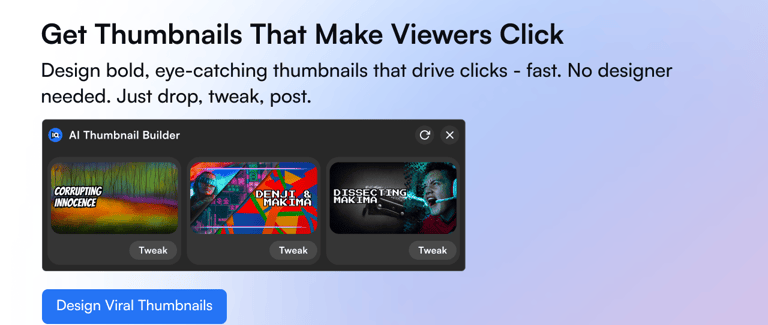
vidIQ helps you optimize every element of your videos: titles, thumbnails, descriptions, tags, hooks, and pacing.
Optimization features:
Title suggestions with predicted click-through rates
Thumbnail A/B testing (in some plans)
Description templates with SEO best practices
Tag recommendations based on high-ranking videos
Hook analyzer (first 30 seconds of video)
Pacing suggestions (where viewers drop off)
My experience: I tested two thumbnails using vidIQ's A/B testing feature. Version A (bold text + face) got 12% CTR. Version B (just bold text, no face) got 6% CTR. Without testing, I would've used Version B because I'm camera-shy. vidIQ saved me from cutting my views in half.
The title suggestions are solid but sometimes too clickbait-y. It suggested "THIS YouTube Trick Will EXPLODE Your Views!" for a technical tutorial. Hard pass.
What works:
A/B testing removes guesswork
Tag recommendations save time
Hook analyzer shows exactly where people leave
Description templates follow YouTube SEO best practices
What's annoying:
Title suggestions can be too sensational
Thumbnail scores feel random (same thumbnail rated differently each day)
Not all plans include A/B testing (locked behind higher tiers)
Rating: 7.5/10 — Helpful but not always on-point.
6. Browser Extension (YouTube Integration)
This is vidIQ's killer feature. The browser extension integrates directly into YouTube, showing you insights without leaving the platform.
What it does:
Displays SEO scores next to every video
Shows competitor tags and keywords
Displays views-per-hour and engagement rates
Suggests optimizations while you upload
Tracks trending videos in your niche
My experience: I browse YouTube differently now. When I see a viral video in my niche, I instantly see their tags, upload time, and engagement metrics. It's like having x-ray vision for YouTube success.
The extension also reminds me to optimize titles and tags before publishing. Without it, I'd forget half the time.
Pros:
Seamless integration (feels native to YouTube)
Saves time (no switching between tabs)
Insights at your fingertips
Cons:
Can slow down YouTube loading times
Sometimes conflicts with other extensions
Clutters the interface if you don't customize it
Rating: 9/10 — The extension alone justifies using vidIQ.
Want to see how vidIQ can grow your channel? Check current pricing — free plan available.
Pricing Plans: What Does It Actually Cost?
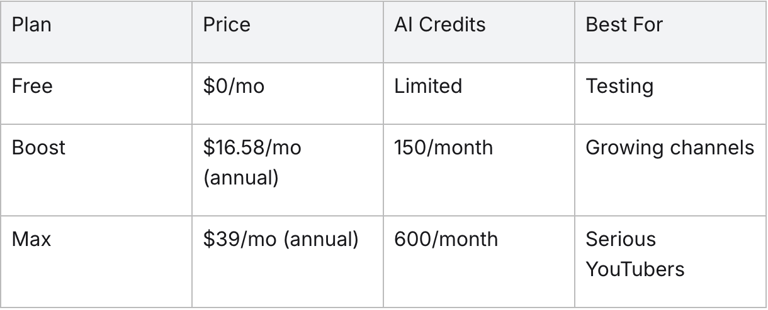
vidIQ uses a tiered pricing model with monthly or annual billing (annual saves about 20%, equivalent to 2 free months). Here's the breakdown:
Pricing Breakdown (2026)
Notes:
Annual billing saves ~20% (basically 2 free months)
Overages charged for extra AI credits
Free plan is non-commercial use only
All paid plans include commercial usage rights
What Can You Actually Do With Each Plan?
Free Plan:
Good for: Testing vidIQ before committing
Limitations: Very limited keyword data, no competitor tracking, no AI features
My take: Useful for 1-2 weeks of testing, but you'll hit limits fast
Boost Plan ($16.58/mo):
Good for: Creators publishing 1-4 videos per week
What you get: Full keyword research, AI Coach (limited), 150 AI credits/month, competitor tracking
My take: Best value for most creators. This is the sweet spot.
Max Plan ($39/mo):
Good for: Daily uploaders or data-obsessed creators
What you get: Unlimited AI conversations, 600 AI credits (4x more Shorts generation)
My take: Worth it if you're creating Shorts daily or need constant AI feedback
Coaching Plan ($99/mo):
Good for: Established creators stuck at a plateau
What you get: 1-on-1 asynchronous coaching with YouTube experts
My take: Only worth it if you're monetized and reinvesting in growth. Expensive otherwise.
Enterprise (Custom):
Good for: Agencies managing multiple client channels
My take: Unless you're a business, skip this.
My Pricing Recommendation:
If you're just starting: Use the Free plan for 2 weeks, then upgrade to Boost ($16.58/mo) if you're serious.
If you're publishing 2+ videos/week: Boost ($16.58/mo) is perfect. You'll get 90% of what you need.
If you're monetized and growing: Max ($39/mo) gives you unlimited AI support and more credits for Shorts.
Skip Coaching unless: You're making $1,000+/month from YouTube and need strategic guidance.
💡 Pro tip: Start with annual billing only after testing for 1-2 months. Lock in the discount once you're sure it's worth it.
Pros and Cons (The Honest Truth)
Let me give you the real talk on what's great and what's annoying about vidIQ.
✅ Pros
1. Best keyword research tool for YouTube
No other platform gives you YouTube-specific search volume, competition scores, and related keywords this accurately. This alone makes vidIQ worth it.
2. Competitor intelligence is game-changing
Seeing what's working for others in your niche eliminates guesswork. You can reverse-engineer success instead of hoping your strategy works.
3. Browser extension is incredibly convenient
Having insights directly on YouTube (not in a separate dashboard) saves massive time. You'll use it way more because it's always visible.
4. AI features help generate ideas
When you're stuck on what to create next, the AI Coach can spark ideas based on trending topics and your channel's strengths.
5. Real-time analytics for quick reactions
Views-per-hour and trend detection let you capitalize on momentum fast. Great for reactive content.
6. Educational resources included
Masterclasses from successful creators teach strategies you can implement immediately. Actually valuable, not just fluff.
7. Boosts views and subscribers when used correctly
Multiple creators report 2-3x growth after implementing vidIQ's keyword and optimization strategies.
❌ Cons
1. Pricing feels high for beginners
$16.58/month is a lot when you're making $0 from YouTube. The free plan is too limited to be useful beyond testing.
2. AI recommendations can be generic
Sometimes the AI just says obvious things like "upload consistently" or "improve thumbnails." You can get similar advice from free ChatGPT.
3. Title and thumbnail ratings feel random
The same thumbnail gets different scores on different days with no explanation. Hard to trust the numbers when they're inconsistent.
4. Learning curve for advanced features
There are SO many features that beginners feel overwhelmed. It takes 2-3 weeks to figure out what's actually useful.
5. Doesn't guarantee growth
Some users report no real view or subscriber boosts. vidIQ gives you data, but you still have to create good content and execute strategy.
6. Browser extension can slow down YouTube
Occasionally causes lag when loading videos or navigating YouTube. Not a dealbreaker, but annoying.
7. Competitor data isn't always accurate
Views-per-hour and engagement metrics can be off by 10-20%. Close enough for trends, but not precise.
Overall Assessment:
The pros outweigh the cons if you're a data-driven creator who wants to optimize everything. But if you're a beginner expecting vidIQ to magically grow your channel without effort, you'll be disappointed.
vidIQ is a tool, not a magic wand. It shows you what to do—you still have to do it.
Who Should Use vidIQ?
Let me break down who gets the most value from this tool.
✅ Perfect For:
YouTubers serious about growth (100-100K subscribers)
If you're past the "upload and pray" phase and want data-driven decisions, vidIQ is essential. It helps you compete strategically.
Creators focused on SEO and searchable content
If you make tutorials, how-tos, or educational content that people search for, vidIQ's keyword research is invaluable.
Competitive creators who study trends
Want to know why your competitor's video got 500K views? vidIQ shows you their exact strategy so you can adapt it.
Data nerds who love analytics
If you obsess over metrics and want to understand the "why" behind your performance, you'll love vidIQ's depth.
Creators publishing 2+ videos per week
The more you upload, the more valuable vidIQ becomes. Keyword research and optimization compound with volume.
Monetized creators reinvesting in growth
If YouTube pays your bills (or could soon), $16-39/month is a no-brainer investment.
Maybe For:
Complete beginners (0-100 subscribers)
You'll probably find vidIQ overwhelming. Focus on creating good content first, then optimize later. The free plan might be enough to start.
Creators making purely entertainment content
If your videos aren't searchable (vlogs, comedy sketches, commentary), vidIQ's keyword tools are less useful. Stick to analytics and competitor tracking.
Not Ideal For:
People expecting instant results
vidIQ doesn't create content for you or guarantee views. If you're not willing to put in strategic work, it won't help.
Creators who hate data/analytics
If numbers make your eyes glaze over, vidIQ will feel like homework. Some creators succeed purely on intuition and creativity—that's valid too.
Hobbyists posting once a month
$16.58/month doesn't make sense if you upload sporadically. The free plan or no tool at all is fine for casual creators.
People on a very tight budget
If $16/month is a financial strain, use the free version of TubeBuddy instead (it's more generous) or just rely on YouTube Studio.
vidIQ vs TubeBuddy: Which Is Better?
This is the big question. Both tools dominate the YouTube growth space, but they have different strengths.
Head-to-Head Comparison
Feature vidIQ TubeBuddy Winner Keyword Research Extensive search volume, related terms YouTube-specific, A/B testing focus Tie (different strengths) Analytics Advanced real-time, AI Coach, trends Strong bulk processing, productivity vidIQ Optimization AI-driven titles/thumbnails/hooks A/B testing, bulk updates, cards TubeBuddy AI Features Max Mode AI, Shorts generation Basic AI suggestions vidIQ Pricing Free (limited), Boost $16, Max $39 Free (basic), Pro $4.50, Legend $20+ TubeBuddy (cheaper) User Experience Intuitive but overwhelming for newbies More user-friendly TubeBuddy Best For Data-savvy creators, AI/analytics Beginners, workflow efficiency Depends on needs
My Take:
Choose vidIQ if:
You want the most advanced analytics and AI features
You're data-driven and love digging into metrics
You're willing to pay $16-39/month for depth
You create searchable content (tutorials, how-tos)
Choose TubeBuddy if:
You're a beginner and want a simpler interface
You need bulk editing tools (updating 50 videos at once)
You're on a tight budget ($4.50/month vs $16/month)
You prioritize workflow efficiency over deep analytics
Use both if:
You're a serious creator reinvesting in growth
You want vidIQ's analytics + TubeBuddy's workflow tools
Many successful YouTubers use both simultaneously
The honest truth: vidIQ is better for predictive insights and growth strategy. TubeBuddy is better for practical day-to-day optimization. Neither is objectively "better"—it depends on your needs.
Common Complaints About vidIQ
Let me address the most frequent criticisms I've seen from other YouTubers:
"The ratings feel random and meaningless"
What people say: "My title scored 92% yesterday, now it's 65% without any changes."
My take: This is true and frustrating. The SEO scores fluctuate based on trending keywords and competition, but vidIQ doesn't explain why. Use the scores as rough guidance, not gospel.
"It's too expensive for small channels"
What people say: "I'm not making money yet, so $16/month feels like a waste."
My take: Fair criticism. The free plan is too limited, and $16/month is steep when you're at zero revenue. Consider TubeBuddy's $4.50 plan or just use YouTube Studio until you're monetized.
"AI recommendations are generic"
What people say: "The AI just tells me obvious things like 'be consistent' or 'improve thumbnails.'"
My take: Partly true. The AI Coach gives decent ideas but isn't revolutionary. You can get 80% of the same advice from ChatGPT for free. The real value is in keyword research and competitor tracking, not AI.
"It didn't grow my channel"
What people say: "I used vidIQ for 3 months and saw no results."
My take: vidIQ is a tool, not a strategy. It shows you what to optimize, but if your content isn't good or you're targeting the wrong audience, no tool will save you. Data + great content = growth. Data alone ≠ growth.
"The interface is overwhelming"
What people say: "There are too many features. I don't know where to start."
My take: Valid. vidIQ throws everything at you at once. Focus on keyword research and competitor tracking first. Ignore the rest until you're comfortable.
"Competitor data is inaccurate"
What people say: "Views-per-hour doesn't match what I see on their channel."
My take: True. The data is often off by 10-20%. Use it for trends and patterns, not exact numbers.
Final Verdict: Is vidIQ Worth It?
Yes—if you're serious about YouTube growth.
vidIQ is the most powerful YouTube SEO and analytics tool available in 2026. The keyword research, competitor tracking, and real-time analytics give you a massive advantage over creators who are just winging it.
Here's my bottom line:
If you're publishing 2+ videos per week and want to grow strategically, vidIQ is a no-brainer at $16.58/month. The time you save on keyword research alone justifies the cost, and the competitor insights help you avoid costly mistakes.
If you're a beginner with under 1,000 subscribers, use the free plan for a few weeks, then decide if it's worth upgrading. You might be better off focusing on content quality first and optimization later.
If you're monetized and reinvesting in growth, the Max plan ($39/mo) is worth it for unlimited AI support and extra credits.
Who Gets the Most Value:
The Boost plan ($16.58/mo) is the sweet spot for most creators. It gives you:
Full keyword research and SEO tools
Competitor tracking for up to 5 channels
AI Coach with 150 credits/month
Masterclasses and educational content
Browser extension with real-time insights
For less than the cost of lunch, you're getting a full YouTube growth consultant.
The Bottom Line:
Rating: 4.8/5 stars
vidIQ isn't perfect (pricing is high for beginners, AI can be generic, ratings feel inconsistent), but it's the best tool for data-driven YouTube growth. The keyword research and competitor intelligence alone make it worth the investment for serious creators.
I've been using it for weeks, and it's already improved my upload strategy, keyword targeting, and content planning. The ROI is clear if you actually use the data.
If you're tired of guessing why your videos aren't getting views, vidIQ gives you the answers. Start with the free plan and see if it clicks. You'll know within a week if it's worth upgrading.